Facebook Messenger
Connect a Facebook Page — including the Page subscription and Development-mode traps that make a "verified" webhook stay silent.
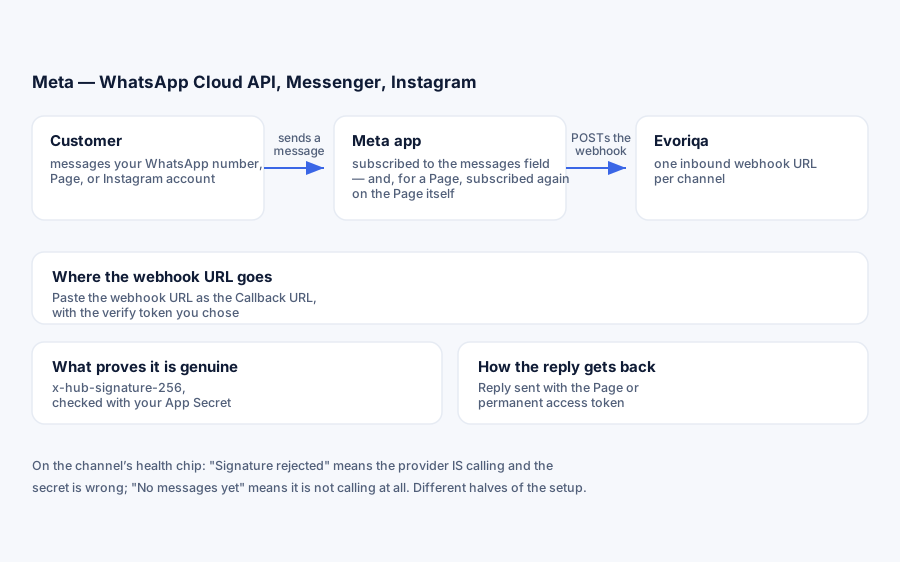
What you need
A Meta developer app of type Business with the Messenger product added, and a Facebook Page you administer.
Meta gates this channel in two places that are silent when shut, and nearly every "webhook verified but nothing arrives" setup is one of them:
- 1An app in Development mode delivers events only for people holding a role on the app or the Page.
- 2The app-level webhook subscription does nothing until the Page itself is also subscribed.
Connect
There are two separate subscriptions in Meta's dashboard, on the same screen, that look almost identical. Both are required. Steps 3 and 4 below are those two — do not stop after step 3.
- 1Meta app → Messenger → Settings → Access Tokens. Connect your Page and Generate token — that is the Page access token. The Meta App Secret is under app → Settings → Basic.
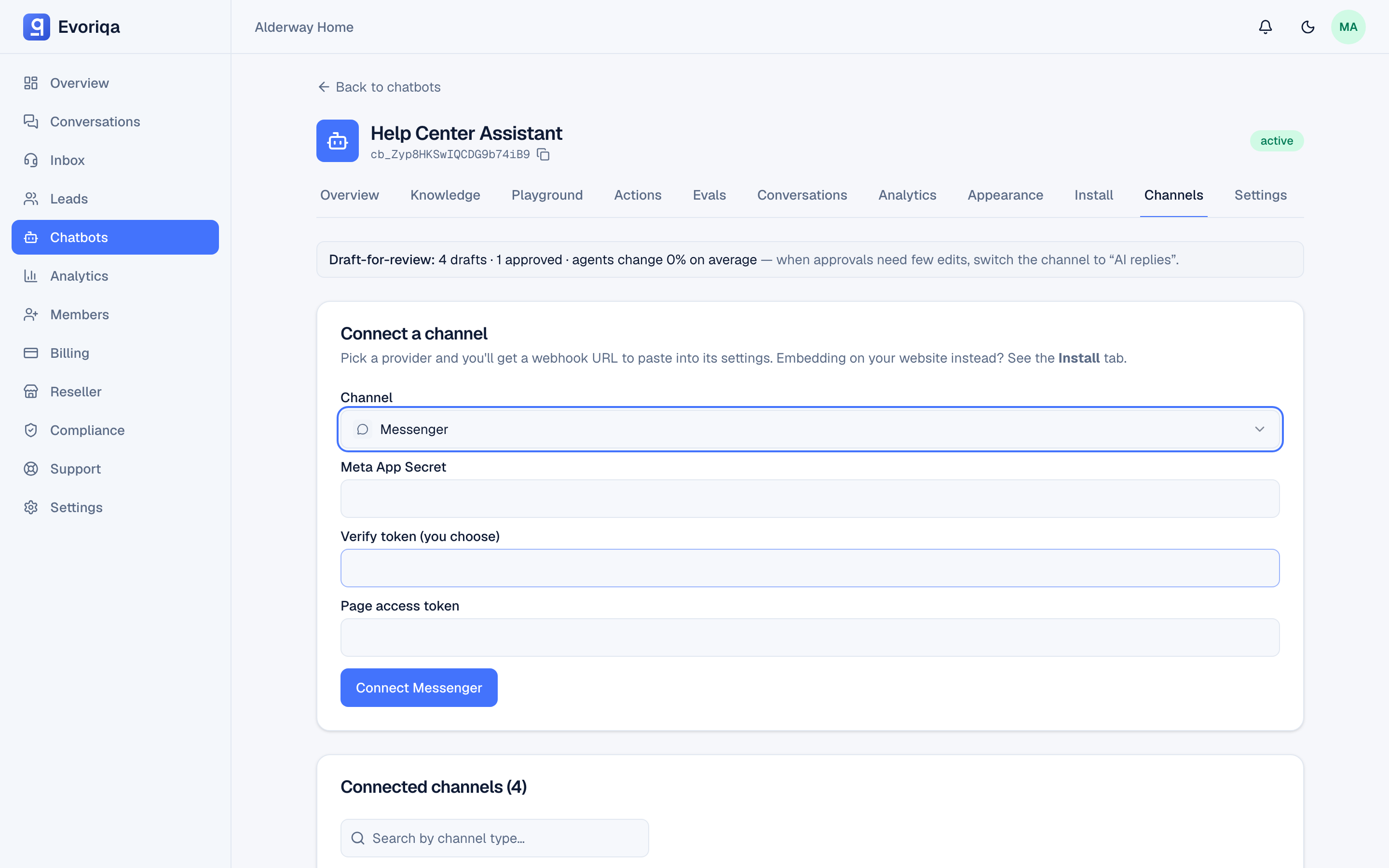
- 2In Evoriqa, open the chatbot's Channels tab → Connect a channel, pick Messenger, and fill in:
Field Where it comes from Looks like Meta App Secret App → Settings → Basic 8f1c9d2ba4…Verify token Any string you choose evoriqa-page-verifyPage access token Step 1 EAAG…Then press Connect Messenger. Connecting from a chatbot's Channels tab attaches the channel to that chatbot — and a channel with no chatbot attached ingests messages but never answers them, which from Messenger looks exactly like a dead integration.
Evoriqa then shows the channel's webhook URL, unique to this channel:
https://app.evoriqa.com/api/channels/9c1f2b6a-4d83-4a11-8b57-2f0e6d7c1a44/inboundCopy it. On a custom domain, the host is your domain instead of
app.evoriqa.com— use whatever the tab shows. - 3Subscription 1 — the app. Meta app → Messenger → Settings → Webhooks → Add Callback URL. Paste the webhook URL and the same verify token, then Verify and save. Tick the webhook field
messages. Leavemessage_echoesoff — it reflects the Page's own replies back, and they are discarded at ingest anyway. - 4Subscription 2 — the Page. The step most setups miss, and the single most common cause of a green "Verified" webhook that never fires. Still in the Webhooks panel, scroll to the Page list below the callback URL. Your Page has its own Webhook Subscription column with an Add subscriptions (or Edit) control — open it and tick
messagesthere as well.Step 3 subscribes the app to the field. Step 4 subscribes the Page to the app. Until both are set, Meta never calls the webhook at all — with no error surfaced anywhere.
Confirm the Page subscription
The API equivalent of step 4, if you would rather not trust the UI:
PAGE_TOKEN='EAAG…'   # the Page access token from step 1

curl -s "https://graph.facebook.com/v26.0/me/subscribed_apps?access_token=$PAGE_TOKEN"A subscribed Page answers with your Meta app listed, messages among its fields (name and id here are the app's, not the Page's):
{
  "data": [
    {
      "subscribed_fields": ["messages"],
      "name": "Evoriqa Messenger",
      "id": "1043827719204553"
    }
  ]
}An empty "data": [] means step 4 was never done — subscribe with:
curl -X POST "https://graph.facebook.com/v26.0/me/subscribed_apps?subscribed_fields=messages&access_token=$PAGE_TOKEN"Both of those calls need the pages_manage_metadata permission, which a plain messaging token does not carry. If you get:
{
  "error": {
    "message": "(#200) Requires pages_manage_metadata permission to manage the object",
    "code": 200
  }
}nothing is broken — the token is valid (a broken token returns code 190), it just cannot read that endpoint. Either use the dashboard for step 4, or mint a token with pages_manage_metadata added in Graph API Explorer for the check and discard it afterwards. Evoriqa itself only ever needs pages_messaging.
Connect with the API
`POST /channels` takes the same three fields as the form, in a config object. All three are required — omit one and the call fails 422 naming it:
{
  "type": "messenger",
  "chatbotId": "3f2504e0-4f89-41d3-9a0c-0305e82c3301",
  "config": {
    "appSecret": "8f1c…",
    "verifyToken": "my-verify-token",
    "pageAccessToken": "EAAG…"
  }
}In production the Page access token is checked against the Graph API before the channel is created, so a wrong or expired token fails here rather than at the first inbound message. Add "graphVersion": "v27.0" to pin a Graph version for this channel. The response returns the inbound secret once — it is what authenticates Meta's webhook calls.
Verify it works
Message the Page from an account that holds a role on the app (App roles → add yourself as Admin, Developer, or Tester) or on the Page — and not from the Page's own identity. While the app is in Development mode, Meta silently drops events from everyone else.
The conversation should appear in the Inbox tagged Messenger. Inbound requests are verified with x-hub-signature-256 against the app secret. Images, files, and stickers arrive as attachments with their CDN links.
The channel row on the chatbot's Channels tab carries a health chip showing the last message received and the last one rejected. It splits any problem in one look: nothing received means Meta is not calling you (steps 3 and 4); rejected means Meta is calling and the app secret is wrong; received but unanswered means the reply failed, not the webhook.
Test the webhook without Meta
To prove the inbound path independently of Meta's delivery, post a signed payload yourself — the same x-hub-signature-256 scheme Meta uses. Fill in your app secret and the webhook URL Evoriqa gave you in step 2:
APP_SECRET='8f1c9d2ba4…'
URL='https://app.evoriqa.com/api/channels/9c1f2b6a-4d83-4a11-8b57-2f0e6d7c1a44/inbound'
BODY='{"entry":[{"messaging":[{"sender":{"id":"7391045826113947"},"message":{"mid":"m_test_1","text":"hello from curl"}}]}]}'

SIG=$(printf '%s' "$BODY" | openssl dgst -sha256 -hmac "$APP_SECRET" -r | cut -d' ' -f1)
curl -s -X POST "$URL" -H "Content-Type: application/json" \
-H "x-hub-signature-256: sha256=$SIG" --data "$BODY"A healthy channel answers:
{ "success": true, "data": { "received": true, "ingested": 1 } }That message now sits in your Inbox as a real Messenger thread, and the AI answers it — so everything on the Evoriqa side works and any remaining problem is Meta's subscriptions. (The AI's reply is sent to sender id 7391045826113947, which Meta rejects as an unknown PSID — expected for a synthetic test.)
A 403 instead means the App Secret stored on the channel is wrong — it comes from app → Settings → Basic, and is not the App ID:
{
  "success": false,
  "error": { "code": "FORBIDDEN", "message": "Invalid Meta signature." }
}Before real customers can message you
The app must be switched to Live and granted Advanced Access to pages_messaging through Meta's App Review, which requires business verification. Until then the channel works only for app and Page roles — enough for a pilot, not for launch.
Testing locally
On app.evoriqa.com this section does not apply — skip to Troubleshooting. It is for self-hosted deployments running Evoriqa on a developer machine.
Meta will not call localhost. Put a tunnel (cloudflared, ngrok) in front of the dev server and point APP_URL at the tunnel origin, because the webhook URL shown at connect time is built from it — a stale value hands Meta an address it cannot reach and the step 3 handshake fails.
Quick tunnels hand out a new hostname every restart. When that happens, the callback URL Meta holds points at a host that no longer exists and delivery stops silently — update APP_URL, restart both the server and the worker, then re-enter the new callback URL in step 3.
Troubleshooting
| Symptom | Cause |
|---|---|
| The URL couldn't be validated | The callback is unreachable over HTTPS, or the verify token differs |
| Verified but No messages yet | The Page subscription (step 4) is missing, or the app is in Development mode and the sender has no role |
| Signature rejected | Meta is delivering; the app secret on the channel is wrong |
| Message lands in the inbox, no AI reply | The channel has no chatbot attached, AI replies are switched off, or the workspace is out of credits or over its message quota |
| Replies not sending | The Page token is invalid, or pages_messaging Advanced Access is missing |
(#200) Requires pages_manage_metadata | Only affects the subscribed_apps check, not the channel — see Confirm the Page subscription |
Where to go next
- Instagram — the same app, one extra step.
Last updated