Slack
Create a Slack app, connect it with the bot token and signing secret, and get events actually delivered — scopes, Socket Mode, and all.
Slack answers with AI by default, like the other chat channels. See Channels overview.
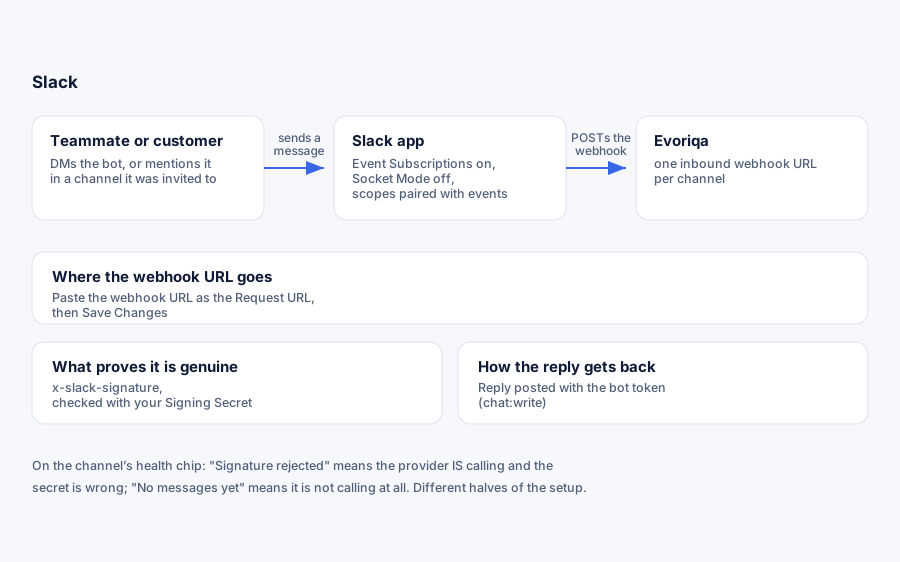
What you need
A Slack app. Slack only issues a bot token through an app — there is no standalone token — but creating one takes about two minutes.
Connect
- 1Go to api.slack.com/apps → Create New App → From scratch, and pick the workspace.
- 2OAuth & Permissions → Bot Token Scopes. Add
chat:writeto send replies, plus one read scope per surface the bot should listen on:Scope Surface im:historyDirect messages channels:historyPublic channels groups:historyPrivate channels app_mentions:readBeing @-tagged - 3Install to Workspace and copy the Bot User OAuth Token (
xoxb-…). - 4Basic Information → App Credentials and copy the Signing Secret.
- 5In Evoriqa, add a Slack channel with both values, then copy the webhook URL it shows.
- 6Socket Mode → off. With Socket Mode on, Slack never POSTs your Request URL at all — even though it still displays as Verified.
- 7Event Subscriptions → enable, paste the webhook URL as the Request URL (the verification challenge is answered automatically), and subscribe to the bot events matching your scopes:
message.im,message.channels,message.groups,app_mention. Press Save Changes — the green Verified badge alone does not save the URL. Reinstall the app after changing events. - 8Invite the bot:
/invite @YourBotin a channel, or DM it. A private channel accepts the bot only via/inviterun from inside it.
Each scope pairs with its event. A scope without its event delivers nothing — and so does an event without its scope. This is the single most common reason a correctly "verified" Slack app stays silent.
Connect with the API
`POST /channels` replaces step 5 — the rest of the Slack-side setup still has to be done in Slack:
{
  "type": "slack",
  "chatbotId": "3f2504e0-4f89-41d3-9a0c-0305e82c3301",
  "config": {
    "signingSecret": "…",
    "botToken": "xoxb-…"
  }
}Unlike the other channels, Slack's config is not validated at connect. A slack channel created without signingSecret or botToken returns 201 and looks connected, then rejects Slack's first event ("Slack channel is missing signingSecret") or silently fails to reply. Check both keys yourself before trusting the 201.
Verify it works
DM the bot, or mention it in a channel it belongs to. The message should appear in the Inbox tagged Slack, and the AI should reply in Slack.
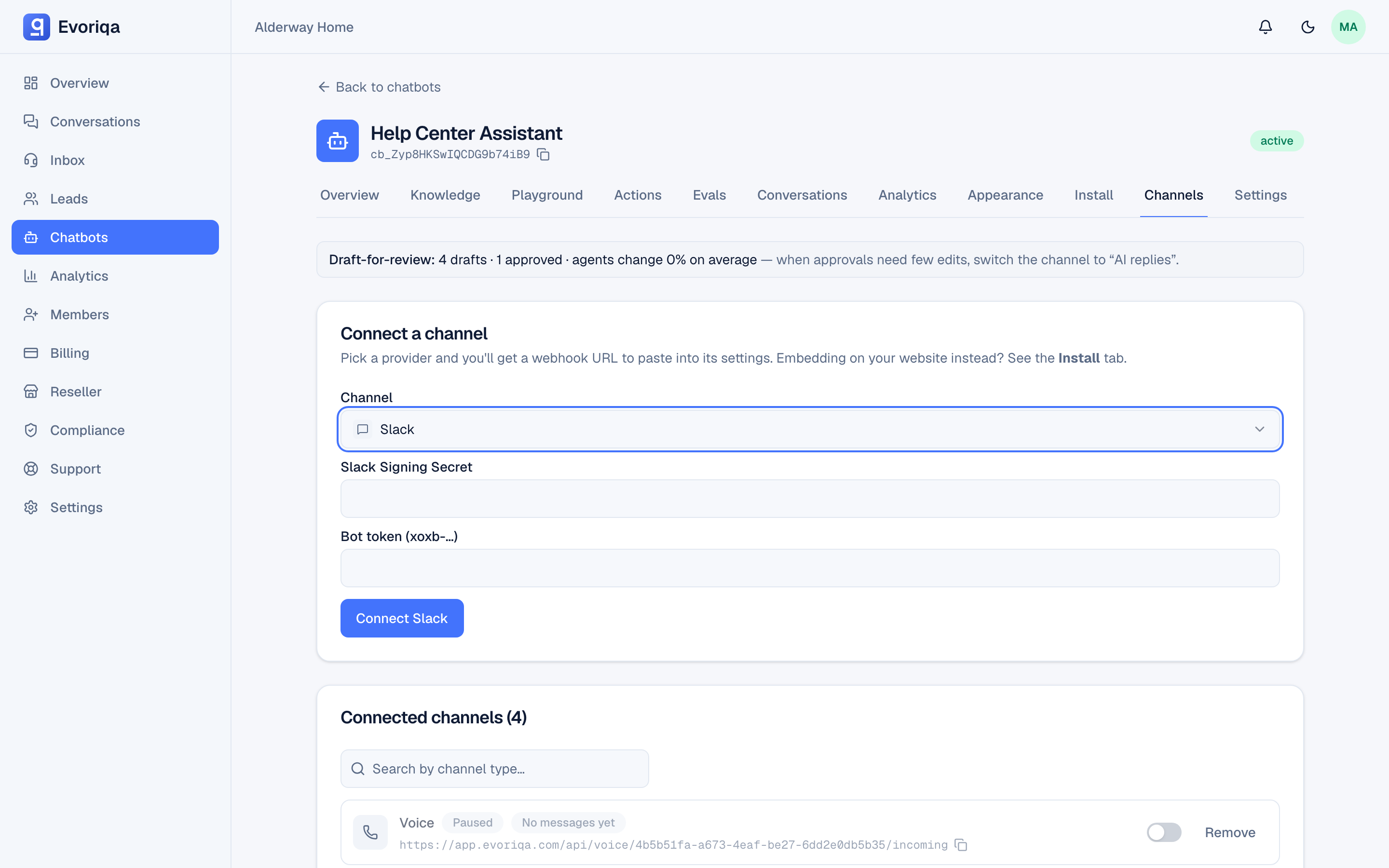
Inbound events are verified with the x-slack-signature header against your signing secret. An @-mention in a channel arrives twice — once as app_mention, once as message — and is collapsed into one inbox message; the bot's own <@U…> token is stripped from the text. The bot's own echoes and message edits are filtered out.
Troubleshooting
| Symptom | Cause |
|---|---|
| Challenge failed at step 7 | The signing secret in the channel does not match the app's — re-copy it |
| Verified but nothing arrives | Socket Mode is on, the Request URL was verified but not saved, or the app was not reinstalled after an event change |
| Signature rejected on the chip | Slack is delivering; the signing secret is wrong |
| Replies not sending | The bot token is invalid or missing chat:write |
Read the channel's health chip first — it distinguishes "Slack sent nothing" from "Slack sent something we rejected".
Where to go next
Last updated