Chatbot settings
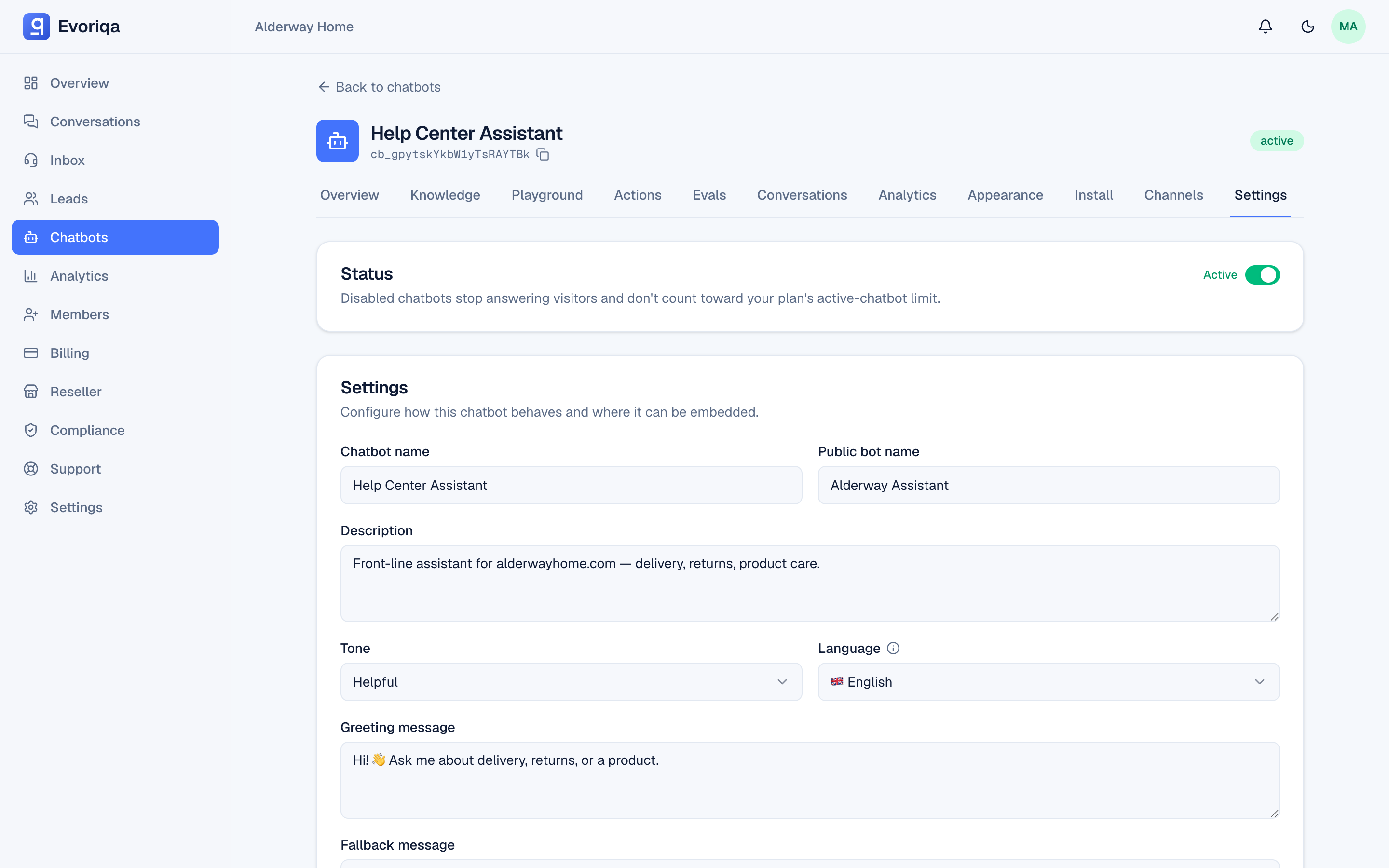
Every chatbot setting — identity, answer behaviour, retrieval tuning, and allowed domains — with its default and the visible effect of changing it.
Open a chatbot and choose Settings. These options shape what the agent says and how it retrieves the content it answers from. Widget colours, position, and lead-capture prompts live under Appearance instead.
Identity
| Setting | Default | Effect |
|---|---|---|
| Name | — | The internal name in the dashboard. Never shown to visitors. 1–120 chars. |
| Bot name | the chatbot's name | The name visitors see in the widget header and on channels. Up to 120 chars; saving it blank resets it to the chatbot's name. |
| Description | empty | A note for your team. Not used by the AI. ≤ 2,000 chars. |
| Status | active | active serves visitors; inactive stops answering everywhere. |
| Language | en | The chatbot's language. Pinning one also sets the widget's own text and its default opening copy. See Languages. |
What the agent says
| Setting | Default | Effect |
|---|---|---|
| Tone | helpful | One of helpful, friendly, professional, casual, concise. Shapes phrasing, not content. |
| Greeting message | empty | The opening message in the widget. ≤ 500 chars. |
| Fallback message | empty | What the agent says when retrieval finds nothing relevant. ≤ 500 chars. Leave it empty to use the product default. |
| System prompt | empty | Free-text instructions prepended to every request — role, rules, things never to say. ≤ 8,000 chars. |
| Max reply sentences | unset | Caps reply length, 1–20 sentences. Unset means no cap. |
The system prompt shapes behaviour; it is not a place to put knowledge. Facts belong in the knowledge base, where they are retrieved per question and can be updated without touching the prompt. Retrieved content also cannot hijack the prompt — a prompt-injection guard sits between the two.
Retrieval tuning
These three change what the model sees before it answers. Change one at a time and re-test in the playground.
| Setting | Default | Range | Effect |
|---|---|---|---|
| Temperature | 0.2 | 0–2 | Higher is more varied, lower more repeatable. Support answers usually want it low. |
| Max context chunks | 6 | 1–20 | How many knowledge chunks are put in front of the model. More context, more cost per turn. |
| Similarity threshold | 0.4 | 0–1 | The minimum match score a chunk needs to be used. Raise it to cut loose matches; raise it too far and the agent falls back more often. |
If the agent answers "I don't know" too often, the usual cause is missing content rather than a threshold — check the retrieved chunks in the playground's Debug panel first. See How retrieval works.
Allowed domains
The allowed-domains list restricts where the widget may run. Up to 50 entries.
A newly created chatbot is seeded with a single * entry, so the widget works on any site the moment you paste the snippet. Replace * with your own domains before going live. An empty list blocks every origin.
Full behaviour, including what a blocked embed looks like, is on Domain allowlist.
Who can change these
Owners, admins, and members can edit chatbot settings. Viewers are read-only — they work the Inbox but cannot change configuration. Business hours are owner and admin only.
Where to go next
Last updated