SMS
Connect an SMS number through Telnyx or Infobip — every field explained, the exact webhook contract, delivery receipts, and the platform's built-in limits.
SMS runs on Telnyx or Infobip and answers with AI by default. You pick the provider when you connect the channel — there is no default, so choose the one you have an account with. (There is no Twilio integration; the platform's two phone providers are Telnyx and Infobip, and they also power Voice and the provider routes for WhatsApp.)
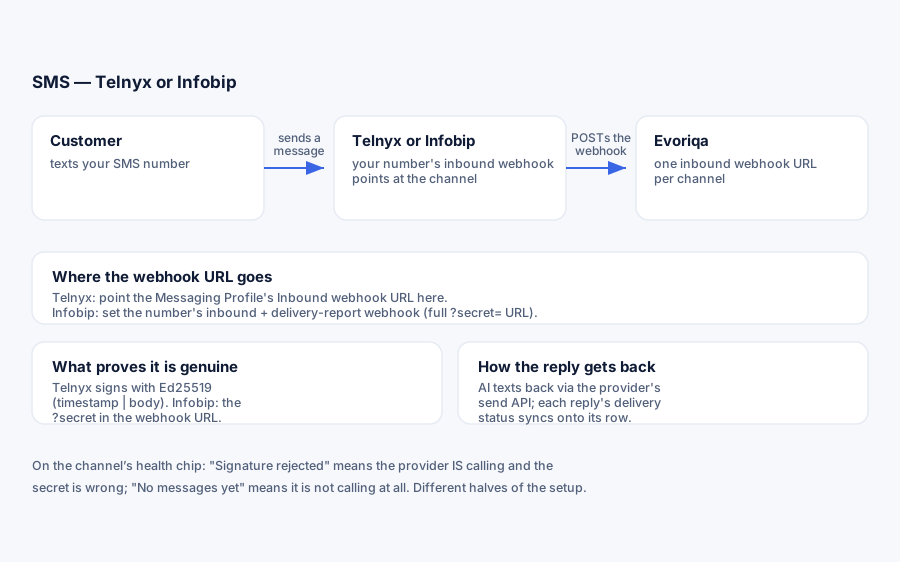
How the channel works
Before the steps, the mental model — it makes every later section obvious:
- 1Connecting the channel stores your provider credentials encrypted and gives you one inbound webhook URL of the form
https://…/api/channels/{channelId}/inbound. That URL is unique to this channel. - 2You point your provider's inbound-message webhook at that URL. From then on, every text to your number is POSTed there.
- 3The platform verifies each POST (Ed25519 signature for Telnyx, a URL secret for Infobip), turns it into a message in a conversation, and — with AI replies on — answers through the same retrieval pipeline as the widget.
- 4Delivery receipts for your outbound replies arrive on the same webhook URL and are synced onto each reply's row in the console.
One number maps to one webhook slot, so one number belongs to one channel. The platform warns you if you try to connect a number that another chatbot already uses (see Duplicate numbers).
What you need
A messaging-capable number from one provider:
- Telnyx — an SMS-capable number, your API key, and the account's public key (the Ed25519 key Telnyx signs webhooks with).
- Infobip — a sender number, your API key, and your account base URL (the
xxxxx.api.infobip.comhost from your Infobip portal).
The number's class matters, not just its capability flag. Carriers route SMS by what the destination number is in their databases: a VoIP- or landline-class number can show "SMS" in your provider's catalog and still be unreachable — texts to it are dropped in transit and never arrive at the provider at all (Telnyx reports the mirror case as 40001 Not routable when sending to such a number). If inbound texts never show up and your provider's own message log is empty, sanity-check the number's class with a carrier lookup before debugging webhooks, and ask the provider for a mobile-class (SMS-routable) number if it comes back voip or landline.
Connect with Telnyx
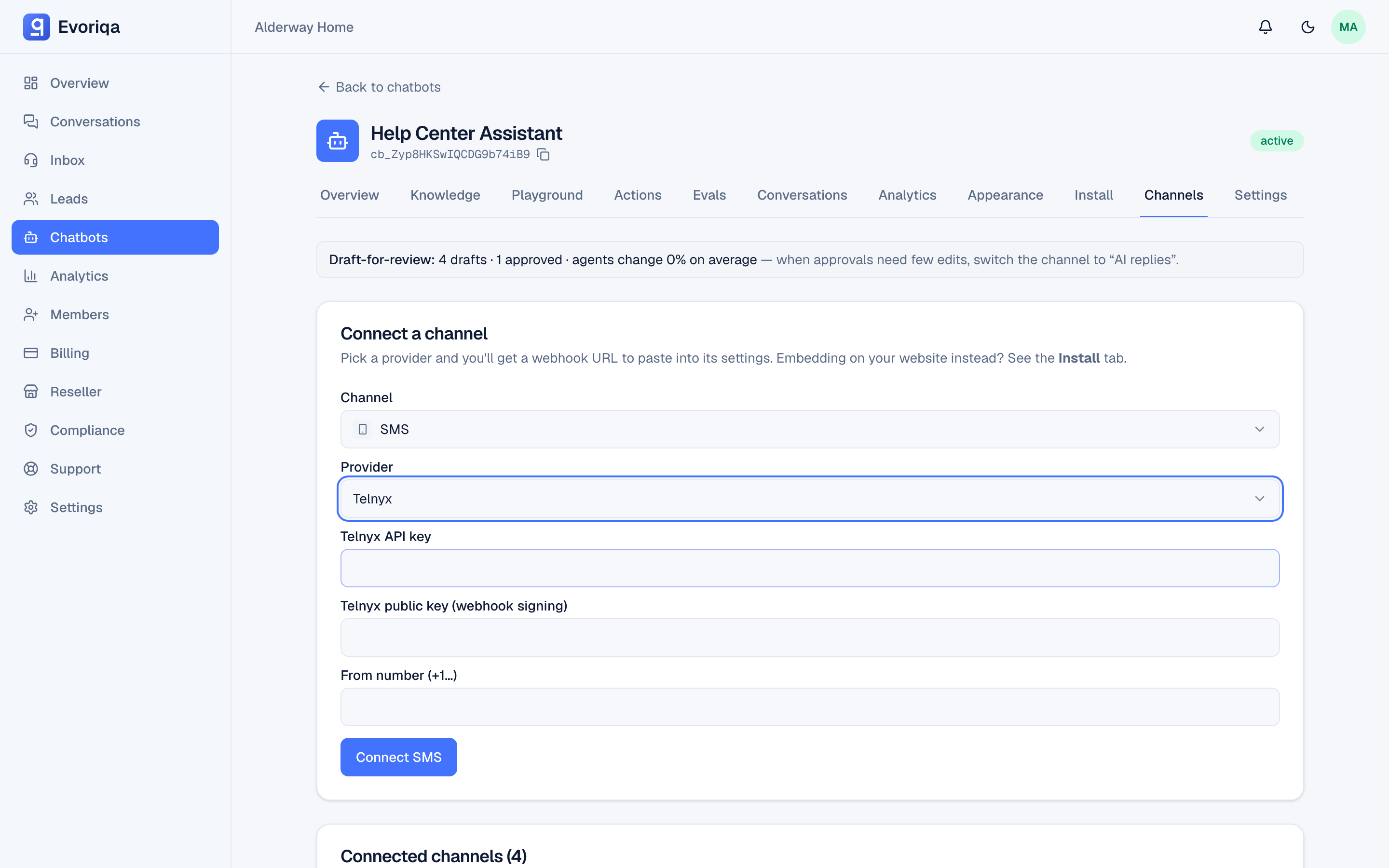
- 1On the chatbot's Channels tab, add an SMS channel, choose Telnyx, and fill:
Field Value Rules API key Telnyx portal → API Keys Required. Used as Bearerauth on sendsPublic key Telnyx portal → Keys & Credentials → Public Key — see Find your Telnyx public key Required. Base64 of the raw 32-byte key — 44 characters ending in =From number Your SMS number in E.164 format, +1…Required API key scopes: Telnyx API keys are not scoped. Every key reaches the whole account, so create a dedicated key for this channel (set an expiry if your policy calls for one). That way you can revoke it without touching anything else.
- 2Copy the webhook URL shown after connecting.
- 3In the Telnyx portal, create a Messaging Profile, set its Inbound webhook URL to that webhook URL (method
POST), and attach the profile to your number. Telnyx refuses to create the profile without whitelisted destinations (its anti-fraud list of countries you may send to — error40331if you skip it): include every country your customers text from, since AI replies go back to those numbers. - 4Sending beyond the US has two extra Telnyx gates worth knowing up front:
- Some destinations only accept alphanumeric senders — set an alpha sender ID on the Messaging Profile (error
40306is Telnyx asking for one). - Many countries (for example Pakistan, and much of MENA/APAC) additionally require that sender ID to be pre-registered with local carriers — error
40305("Alphanumeric sender ID … is not registered for the destination"). Registration goes through Telnyx support and takes weeks, so file it before launch, not at first send.
Find your Telnyx public key
There is nothing to generate. Telnyx creates one Ed25519 key pair per account, keeps the private half to sign every webhook, and shows you the public half to verify them. You copy it; you never make one.
- 1Sign in to the Telnyx Mission Control Portal.
- 2In the left navigation, open Account Settings → Keys & Credentials.
- 3Select the Public Key tab (next to API Keys) and copy the key.
- 4Paste it into the channel's Public key field exactly as shown — no quotes, spaces or line breaks.
What to check before you paste:
- It is not your API key. The API key starts with
KEYand is a secret; the public key is a 44-character base64 string ending in=and is safe to share. Swapping the two is the most common setup mistake. - One key serves the whole account. Every Telnyx SMS and voice channel on the same Telnyx account takes the same public key, in every environment.
- The platform cannot check it at connect. Any value is accepted when you save; a wrong key only shows up when the first webhook arrives and is rejected as Signature rejected. Send one test text right after connecting to prove it.
Rotating the key. If you rotate your account's signing key in Telnyx (POST /v2/inactive_key, then POST /v2/inactive_key/{id}/activate), the new key can take up to 60 minutes to take effect across the account, and both keys may be live for a while. Once it is active, edit every Telnyx channel and paste the new public key — the field is editable in place, no reconnect needed. Until you do, those channels reject every webhook.
How Telnyx webhooks are verified
Inbound webhooks are JSON API-v2 events signed with Ed25519 over {telnyx-timestamp}|{raw body} — headers telnyx-signature-ed25519 (base64 signature) and telnyx-timestamp (Unix seconds). Two things follow:
- A timestamp older than 5 minutes is rejected (replay protection), so a replayed or long-delayed webhook never lands.
- The signature covers the body, not the URL — the webhook verifies on any host, which is why the same public key works across environments.
A failed verification returns 403 and flips the channel's health chip to Signature rejected — the clearest possible signal that Telnyx is calling you but the public key on the channel is wrong.
Inbound texts arrive as message.received events; delivery receipts arrive as message.finalized events on the same URL.
Connect with Infobip
Infobip has the widest global reach — strong MENA/APAC coverage — and registers senders for you.
- 1Add the SMS channel, choose Infobip, and fill:
Field Value Rules API key Infobip portal → Developers → API Keys Required. Used as Appauth on sendsBase URL The xxxxx.api.infobip.comhost — paste it ashttps://xxxxx.api.infobip.comRequired. Validated to match https://<subdomain>.api.infobip.comexactly — anything else is refused, at connect and again on every sendSender Your SMS number Required API key scopes: when you create the key, grant
sms:message:send. That one scope covers every call the platform makes (POST {baseUrl}/sms/3/messages). Inbound messages and delivery reports arrive on the?secret=webhook, which needs no scope. - 2Copy the webhook URL shown after connecting — it already carries a
?secret=…query param, shown once. Treat the whole URL as a credential and keep it private. - 3In the Infobip portal, set that full webhook URL (including
?secret=) as the number's inbound-message webhook and its delivery-report webhook — both point at the same channel URL.
How Infobip webhooks are verified
Infobip does not sign webhooks: the secret in the URL is what authenticates its calls, compared in constant time on every request. A call with a wrong or missing secret is rejected (403) and flips the channel's health chip to Signature rejected. There is no way to re-display the secret later — the connected-channels list masks it as ?secret=••• — so if you lose it, reconnect the channel.
A single Infobip POST can carry inbound messages and delivery reports together; both are processed.
Sender registration (MENA/APAC). Many destinations across the Middle East and parts of APAC require a pre-registered sender ID. Infobip's onboarding team registers these for you; until a sender is approved for a destination, messages there may be blocked or rewritten by the carrier. Register before launch, not at first send. The platform itself does no A2P/10DLC or sender-registration enforcement — carrier compliance lives entirely with the provider.
Connect with the API
`POST /channels` takes the same credentials as either form. config.provider picks the transport, and omitting it fails 422 with "Pick a provider for this channel."
Telnyx — all four keys required:
{
  "type": "sms",
  "chatbotId": "3f2504e0-4f89-41d3-9a0c-0305e82c3301",
  "config": {
    "provider": "telnyx",
    "apiKey": "KEY…",
    "publicKey": "…",
    "fromNumber": "+15550001111"
  }
}Infobip — all four keys required, and baseUrl must match https://<subdomain>.api.infobip.com exactly:
{
  "type": "sms",
  "chatbotId": "3f2504e0-4f89-41d3-9a0c-0305e82c3301",
  "config": {
    "provider": "infobip",
    "apiKey": "…",
    "baseUrl": "https://xxxxx.api.infobip.com",
    "fromNumber": "447860099299"
  }
}Either way the response returns the channel's inboundSecret once. What it is for depends on the provider: on Infobip it is the ?secret= value the webhook URL needs, because Infobip does not sign its calls. On Telnyx the inbound webhook is authenticated by the Ed25519 signature instead, so the URL carries no secret. The same credentials connect Voice and WhatsApp — only type changes.
Verify it works
There is no in-app test button — verification is real traffic. Text the number: the message should appear in the Inbox tagged SMS, and the AI should text back. The channel's health chip narrates the result:
| Chip | Meaning |
|---|---|
| No messages yet | Connected, but the provider has not called the webhook yet |
| Last message Xm ago | Inbound is flowing |
| Signature rejected | The provider called, but verification failed — credentials do not match |
What happens to an inbound text
Understanding the ingest pipeline explains most behaviour you will observe:
- 1Contact — the sender's phone number is matched to (or creates) a contact, so the thread is linked to a person from the first message.
- 2Dedup — each provider message id is remembered; provider retries of the same webhook never create duplicate messages.
- 3Threading — the text joins the sender's existing open SMS conversation on this chatbot, or starts a new one if the last one was closed. The same phone number talking to two different channels stays in two separate threads.
- 4AI reply (if AI replies is on) — the reply is generated after the webhook is acknowledged, so provider timeouts never race the model.
Inbound MMS is supported: media URLs ride along with the message (up to 10 per message on Telnyx; one on Infobip), and a media-only text still arrives as [Customer sent an attachment] plus the link. Those links belong to the provider and can expire — download anything you need to keep.
AI replies and human handoff
SMS honours the channel's AI replies toggle (on by default):
- On — the AI answers new inbound texts with the same grounded pipeline as the widget, subject to your message quota, credit balance, and spend cap. A sender who asks for a person is escalated: the thread flips to
needs_human, enters the inbox wait queue, and gets the fixed acknowledgement ("Got it — connecting you with a member of our team…"). - Off — every new inbound thread lands in the inbox already flagged
needs_human, with alerts for opted-in agents. Nothing is auto-sent.
If an AI turn cannot complete — out of credits, over quota, a provider failure — the thread degrades to that same wait queue with that same acknowledgement. A failed turn is never left as silence. A chatbot paused because your plan no longer covers it takes the same path; one you switched off yourself stays silent, and the thread still reaches the inbox. The AI also stays quiet on any thread a human has already claimed, and on closed threads.
One deliberate design choice worth knowing: the AI reply runs at most once per inbound text. There is no retry queue, because an SMS send has no idempotency key and a retried turn could double-text the customer. If a turn dies mid-flight, the thread degrades to the human queue instead.
Outbound replies
Replies — agent or AI — go out through the conversation's own channel:
- Telnyx —
POST https://api.telnyx.com/v2/messageswith your API key. - Infobip —
POST {baseUrl}/sms/3/messageswith your API key.
Before sending, every reply is normalised to plain text: markdown links become label: url, headings and bold/italic markers are stripped, code fences unwrapped. No stray Markdown reaches a phone.
A reply always leaves from the conversation's own chatbot and channel — it can never be delivered from another bot's number. If the exact originating channel was deleted, the oldest active SMS channel on the same bot is used; if the channel is merely paused, replies to open threads still go out (pause blocks new inbound only).
Attachments cannot be sent on SMS — outbound is text-only, and agents see "Attachments aren't supported on this channel". Send a link instead.
Delivery receipts
Both providers report what happened to each send, on the same channel webhook, and the status is synced onto the reply's row in the console:
| Provider | Event | Maps to |
|---|---|---|
| Telnyx | message.finalized | delivered → Delivered · sent → Sent · delivery_failed / sending_failed → Not delivered |
| Infobip | delivery report (groupName) | DELIVERED → Delivered · UNDELIVERABLE / REJECTED / EXPIRED → Not delivered · PENDING / ACCEPTED → ignored (intermediate) |
Statuses only move forward — a late or reordered receipt can never downgrade a message. A failed send stores the provider's reason on the message and offers a one-click Retry.
Keep replies short
SMS renders no formatting, and long messages are split by the carrier — the platform does not segment, count characters, or truncate; text is passed to the provider verbatim. For an SMS-heavy deployment, set the chatbot's max reply sentences so the model composes short answers in the first place — see Chatbot settings.
Duplicate numbers
One number and channel type map to a single inbound webhook, so a second channel on the same number would silently starve the first. If the number is already connected to another chatbot for the same type, the connect form shows a duplicate-number warning naming that bot. You can still proceed deliberately — for example when migrating a number between bots.
Settings and lifecycle
| Control | Effect |
|---|---|
| AI replies | On (default): AI answers new texts. Off: every new thread goes straight to the human wait queue |
| Pause | Rejects new inbound (provider calls are refused) but keeps credentials, and replies to open threads still send |
| Delete | Removes the channel; the provider keeps calling a dead URL until you update the portal |
Credentials are stored encrypted at rest and decrypted only server-side per use. There is no pending/verifying state — a channel is live the moment it connects; the health chip is what tells you whether traffic is flowing.
Limits
- Inbound webhook: 120 requests per minute per channel/IP; beyond that the provider gets
429 Too many requests. - Inbound body: 2 MiB cap (
413past that). - Telnyx signatures: 5-minute replay window.
- Inbound media: up to 10 attachments per Telnyx message, 1 per Infobip message.
- Outbound: text only — no MMS.
- No STOP/opt-out keyword handling in the platform — unsubscribe keywords are handled (or not) at the provider/carrier level. If your use case requires opt-out compliance, configure it with your provider.
Troubleshooting
| Symptom | Cause |
|---|---|
| No messages yet | The number's inbound webhook is not pointed at the channel URL |
| No messages yet — and the provider's own log is empty too | The text never reached the provider: the number is VoIP/landline-class and carriers refuse SMS to it — see the number-class note under What you need |
| Signature rejected (Telnyx) | The public key on the channel does not match the account — re-paste it from Keys & Credentials → Public Key, not API Keys |
| Signature rejected (Infobip) | The webhook was called without the ?secret= param, or with the wrong one — use the full URL |
| Inbound works, then stops | Check for a 429 (rate limit) or a paused channel |
| Outbound marked Not delivered | The provider rejected the send — read the stored reason, then Retry |
Not delivered: Telnyx 40331 | The Messaging Profile has no whitelisted destinations covering the recipient's country |
Not delivered: Telnyx 40306 / 40305 | The destination needs an alpha sender ID (40306), or one that is carrier-registered for that country (40305) — see the Telnyx connect steps |
Not delivered: Telnyx 40001 | The recipient's number is not SMS-routable (landline/VoIP) |
| Infobip send stuck PENDING forever | The sender number isn't fully provisioned for SMS on Infobip's side — ask their support to confirm MT routing on the DID |
| Messages land on the wrong chatbot | Another channel claimed the same number; see Duplicate numbers |
| Everything silently dead | If the platform's encryption secret was rotated, stored credentials can no longer decrypt — reconnect the channel |
Where to go next
- WhatsApp via Telnyx or WhatsApp via Infobip — the same credentials, a WhatsApp sender instead of an SMS number.
- Voice — the same Telnyx or Infobip account, a different pipeline.
Last updated