Channels overview
The channel model, how an inbound message becomes a conversation, the connect-time verification result, which channels answer with AI, and channel lifecycle.
A channel connects one chatbot to one place your customers already are: WhatsApp, Messenger, Instagram, Slack, SMS, email, a phone line, or your own website. This page is the shared mental model — how channels are owned, how a message travels from a provider to the inbox and back, and the controls every channel has in common. Each channel's own page covers its provider setup.
Pick the right page
| Channel | Guide | Transport |
|---|---|---|
| Website widget | Website | Embedded script — no provider account |
| Your inbound mail hook | ||
| Slack | Slack | Slack app |
| SMS | SMS | Telnyx or Infobip |
| Meta Cloud API (recommended) · Telnyx · Infobip | Your own Meta app, or a phone provider | |
| Messenger | Messenger | Meta app |
| Meta app | ||
| Voice (phone line) | Voice | Telnyx TeXML or Infobip Calls |
The platform's two phone providers are Telnyx and Infobip — there is no Twilio integration. One provider account covers SMS, WhatsApp, and Voice with the same credentials.
Channels belong to a chatbot
Channels are managed per chatbot, on that bot's Channels tab — owners and admins only. There is no workspace-wide channels page.
Three consequences:
- Connecting a channel means picking the chatbot up front.
- Deleting a chatbot deletes its channels with it.
- An agent's reply always goes out through the conversation's own chatbot, so a reply can never be delivered from another bot's number or account.
How every channel works
The same pipeline sits behind every channel; knowing it makes each channel page — and each troubleshooting table — obvious.
- 1Connect — you enter the provider's credentials, which are stored encrypted at rest and decrypted only server-side per use. The channel is live immediately; there is no pending or verifying state. Where the provider allows it, a credential check runs at connect — the Meta Graph probe for WhatsApp Cloud, Messenger, and Instagram — and the result is reported as
verified: true. A channel with no such probe (Telnyx SMS, Slack, email) connects withverified: false; it still works, and its credentials are confirmed on the first inbound message, but the dashboard shows an "unverified" notice until then. Afalsenever blocks the connection. - 2One webhook URL — connecting gives you a single inbound URL unique to the channel. You point the provider at it; from then on every customer message is POSTed there. One number or account maps to one webhook slot — connecting the same one on another chatbot shows a duplicate warning naming that bot, because a second connection would silently starve the first.
- 3Verify — every inbound request is authenticated with the provider's scheme (Meta HMAC signatures, Telnyx Ed25519 signatures, Infobip URL secret, and so on — each channel page has its exact contract). Failures are rejected and stamp the health chip.
- 4Ingest — a verified message becomes part of a conversation:
- the sender is linked to a contact (by phone number, email, or platform id);
- the provider's message id is remembered, so webhook retries never duplicate a message;
- the message joins the sender's existing open conversation on this chatbot and channel, or starts a new one. The same person on two channels stays in two threads.
- 5Reply — the AI answers (see below) or an agent replies from the Inbox. Replies are sent through the provider's API and their delivery is tracked (see Outbound delivery).
Which channels answer with AI
| Channel | Default behaviour |
|---|---|
| Website widget | AI answers |
| WhatsApp, Messenger, Instagram, Slack, SMS | AI answers — an AI replies toggle, on by default, can make the channel human-first |
| AI answers, Draft for review, or human-first — starts Off; opt in on the Channels tab | |
| Voice | AI answers, through its own pipeline; not governed by the AI-replies toggle |
Email ships with AI replies Off — a misfired auto-reply in an async medium costs more than a slow human one — but it carries the same reply-mode selector, so you can turn the AI on when you're ready; the Email page covers the email-only loop guard, hourly reply cap and auto-reply headers. See also Voice.
With AI replies on
An inbound message runs the same retrieval pipeline as the widget — grounded answer, cache, deterministic fallback, and pending-action confirmation — subject to your message quota, credit balance, and spend cap. Replies are normalised to plain text per provider — WhatsApp gets its single-star *bold*, links become label: url, headings and code fences are stripped — so no stray Markdown reaches a surface that cannot render it.
The reply is generated after the provider's webhook is acknowledged, so provider timeouts never race the model, and it runs at most once per inbound message — there is no retry queue, because a retried turn could double-message the customer.
A visitor who asks for a person — in any of the 32 languages the product speaks — is escalated: the conversation flips to needs_human, enters the Inbox wait queue, fires handoff alerts, and the visitor gets a fixed acknowledgement:
Got it — connecting you with a member of our team. Someone will reply here
shortly.If an AI turn cannot complete — out of credits, over quota, a provider or tool failure — the thread degrades to that same wait queue with that same acknowledgement. A failed turn is never left as silence.
When the refusal is the budget (credits under one reply's 50-credit reserve, the spend cap, the message quota, or a failed payment), the thread also shows a line in the inbox — AI didn't reply: … with the reason — and the Overview and Channels pages show an AI replies are paused banner. Further messages on that thread wait quietly, with no second acknowledgement. Once the budget is back, the customer's next message goes to the AI again, unless an agent has claimed, been assigned or re-queued the thread in the meantime. A chatbot paused because your plan no longer covers it takes the same path; one you switched off yourself stays silent, and the thread still reaches the inbox.
The AI stays quiet on a thread a human has already claimed, and on a closed one.
With AI replies off
A new inbound thread lands in the inbox already flagged needs_human, with its true arrival time, and alerts fire for opted-in agents. Nothing is auto-sent.
Inbound attachments
A message carrying only an attachment is ingested as a placeholder plus the provider's media link:
[Customer sent an attachment]Those links belong to the provider — they may need the channel's credentials and can expire. Download anything you need to keep. (WhatsApp via Meta goes one step further and resolves media ids into CDN links at ingest — see that page.)
Outbound attachments are email-only. On every other channel replies are text — agents see "Attachments aren't supported on this channel"; send a link instead.
Channel health
Each connected channel shows a health chip, driven by two timestamps: when inbound last arrived, and when a request last failed verification.
| Chip | Means |
|---|---|
| Last message Xm ago | Inbound is working. |
| No messages yet | Connected, but the provider is not calling the webhook yet. |
| Signature rejected | Inbound arrived and failed verification — the credentials do not match. |
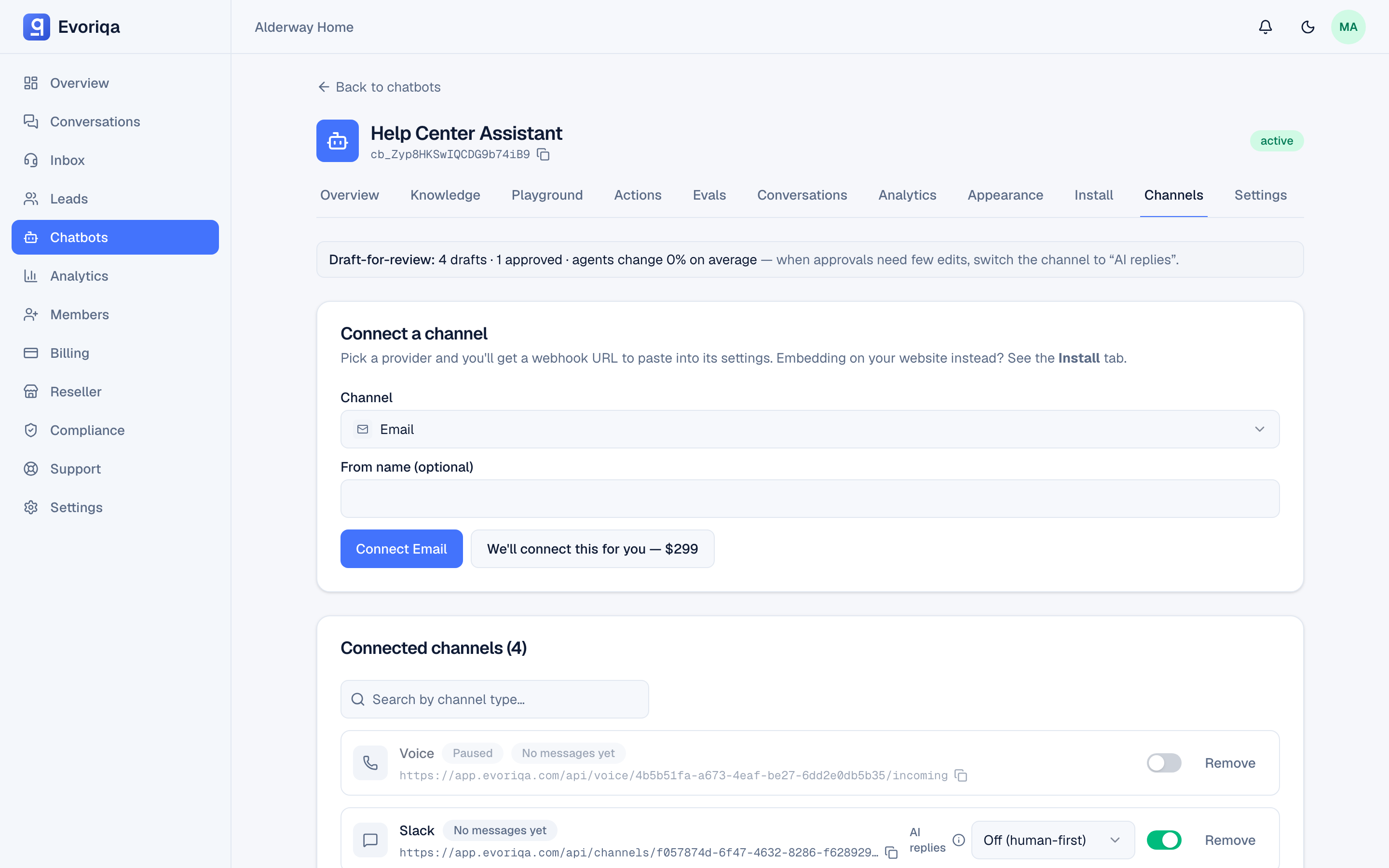
That chip is the first thing to read when a channel seems broken: it separates "the provider is not calling us" from "the provider is calling us and the secret is wrong". There is no in-app test button — verification is real traffic: message the channel and watch the chip.
Outbound delivery
Every reply leaves through the conversation's own channel. If that exact channel was deleted, the oldest active channel of the same type on the same bot is used — never another bot's. A merely paused channel still delivers replies to its open threads (pause blocks new inbound only).
A reply that fails at the provider is marked Not delivered in the console, with the reason stored on the message and a one-click Retry.
Where the provider reports more, the platform syncs it onto the reply's row:
- SMS and the WhatsApp phone providers report delivery receipts (delivered / failed) — see each page's mapping table.
- WhatsApp via the Meta Cloud API goes furthest: the full
sent → delivered → readladder on each reply, plus customer-visible read receipts and a typing indicator while the AI composes — see WhatsApp via Meta.
Delivery statuses only move forward — a late or reordered receipt can never downgrade a message.
Channel lifecycle
| Action | Effect |
|---|---|
| Pause | New inbound is rejected; credentials are kept; replies to open threads still send. Resume any time. |
| Resume | Inbound flows again — the provider was never told anything changed. |
| Delete | The channel and its credentials are removed; the provider keeps calling a dead URL until you update its portal. |
Channels can also be managed programmatically — see the channels API. If you would rather not do the provider-portal legwork yourself, the connect dialog offers a concierge setup where the team connects the channel for you.
Limits that apply everywhere
- Inbound webhooks are rate-limited to 120 requests per minute per channel (voice has its own higher, call-shaped limits).
- Inbound bodies are capped at 2 MiB.
- Signed-webhook providers get replay protection (for example Telnyx's 5-minute signature window).
Where to go next
- Inbox — where every channel's conversations land.
Last updated