Voice
A phone line answered by your chatbot on Telnyx TeXML or Infobip Calls — every setting, all four webhooks, the full call lifecycle, transfer and metering.
Connect a phone number and callers talk to the same chatbot that powers your widget — same knowledge base, same settings. Voice runs on Telnyx (TeXML) or Infobip (Calls); you pick the provider when you connect the channel.
This is an AI speech agent, not an IVR: there are no DTMF menus, no call recording, and no voicemail boxes. The provider does the speech-to-text and text-to-speech; the platform only ever handles plain text, through the same retrieval pipeline as chat. Calls are inbound only — the platform never originates calls.
Voice runs its own pipeline and is not governed by the per-channel AI-replies toggle. A voice channel always answers with AI; what you configure is where it transfers to when a human is needed.
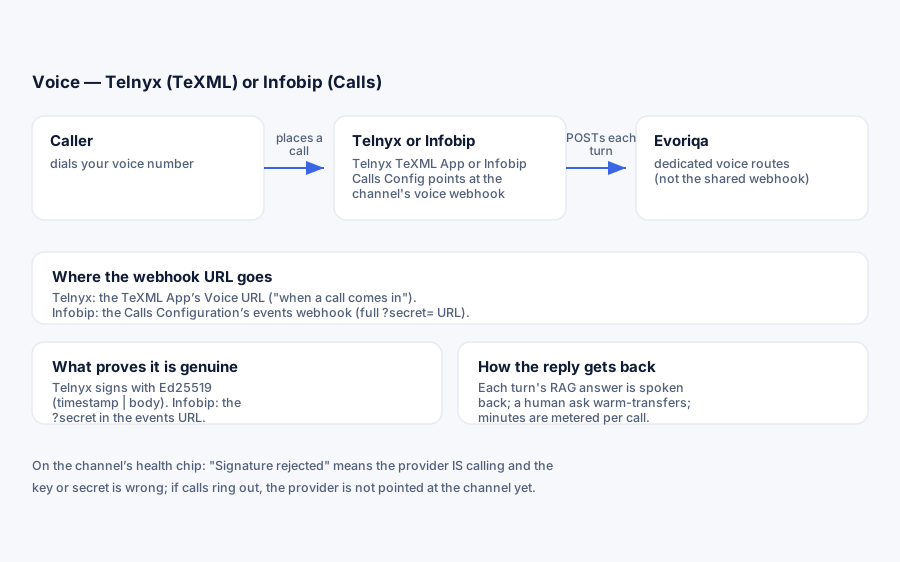
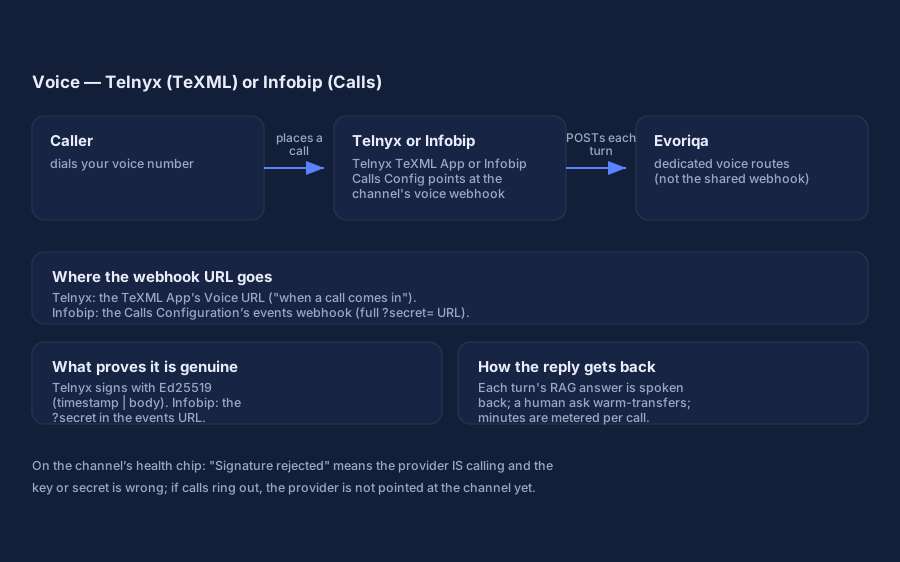
How a call works, end to end
The whole channel is easier to configure once you can picture one call:
- 1Ring — the provider POSTs to the channel's voice webhook. The platform verifies the request, opens (or reuses) a conversation linked to the caller's number, and checks the plan's voice-minute cap.
- 2Greeting — the caller hears the optional AI-disclosure line, then the greeting, and the microphone opens. Barge-in is enabled: the caller can start talking over the greeting.
- 3Turns — each caller utterance is transcribed by the provider and POSTed back. The platform runs the same grounded answer pipeline as chat and speaks the reply, then re-opens the microphone — with "Is there anything else I can help with?" appended, unless the reply already ends on a question of its own (a booking flow asking for the caller's email keeps its question, nothing more).
- 4Silence — a silent turn gets one re-prompt ("Sorry, I didn't catch that…"); a second silent turn ends the call politely.
- 5Handoff — if the caller asks for a person (or the AI hits a knowledge gap and the caller says "agent"), the call warm-transfers to your transfer-to number — see Human handoff.
- 6Goodbye — "bye", "that's all", and similar phrases end the call with a spoken goodbye; the provider's end-of-call event closes the conversation and meters the minutes.
Callers with a withheld number are handled: each anonymous call gets its own per-call identity, so anonymous callers never collapse into one contact.
What you need
A voice-capable number from one provider, plus that provider's call-control surface:
- Telnyx — a voice-capable number and a TeXML Application (Telnyx's TwiML-compatible call-control surface), your API key, and the account's public key.
- Infobip — a voice-capable number and a Calls Configuration (Infobip's call-control surface), your API key, and your account base URL.
For live transfer, either provider also takes an optional transfer-to number.
Infobip: the DID must be enabled for inbound Calls. A number can be listed as voice-capable and still be rejected by Infobip's own platform on every inbound call — the caller hears a pickup then an instant drop, and the Infobip call log (Voice → Calls, or GET /calls/1/calls/history) shows the call FAILED at 0 seconds with errorCode 10300 FORBIDDEN, hangupSource: PLATFORM. That rejection happens before any webhook is sent, so nothing you configure on the Evoriqa side can fix it: ask Infobip support to enable inbound voice (Calls API) on the DID. Trial accounts and some number classes ship without it.
Connect with Telnyx (TeXML)
- 1Add a Voice channel, choose Telnyx, and fill:
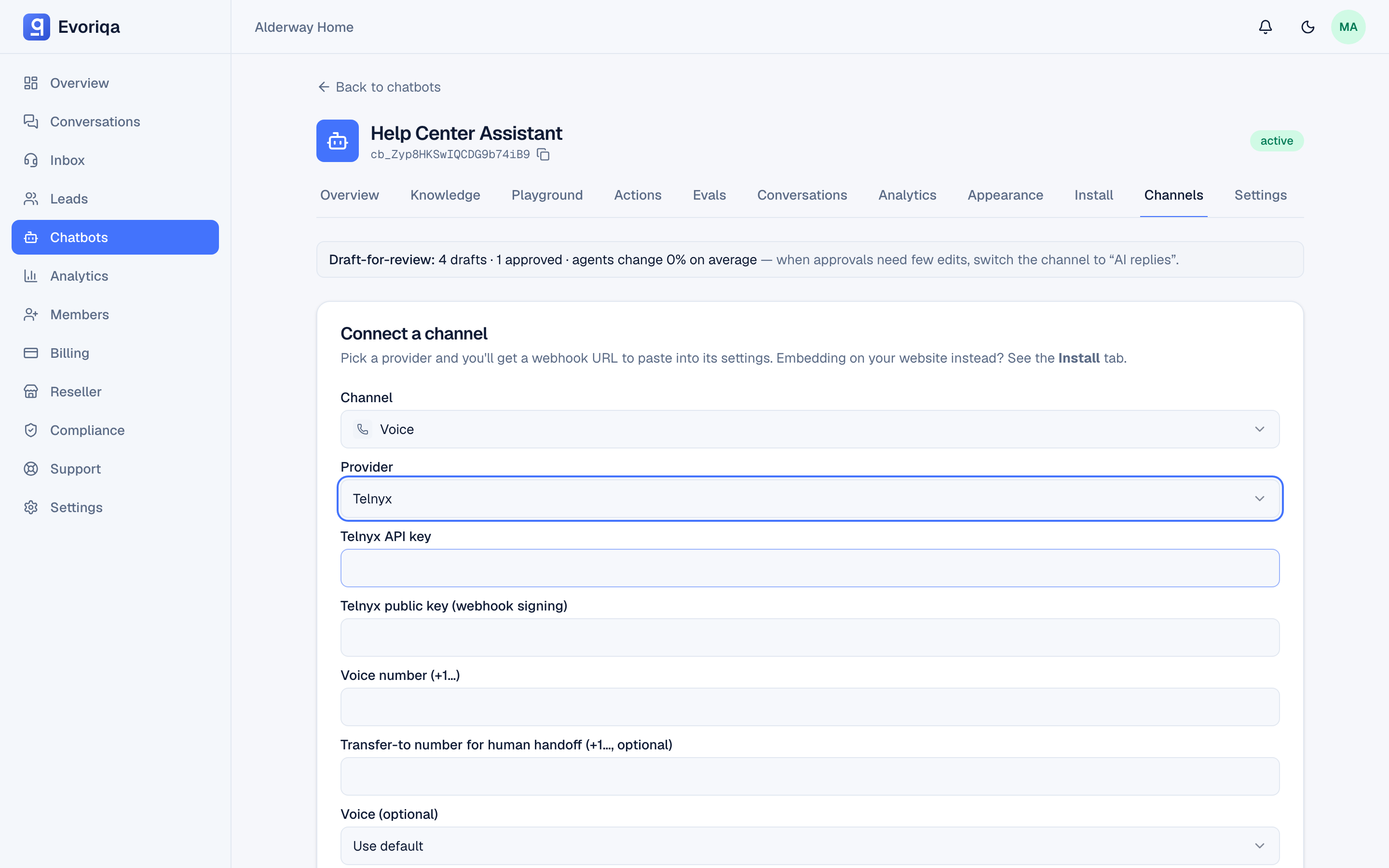
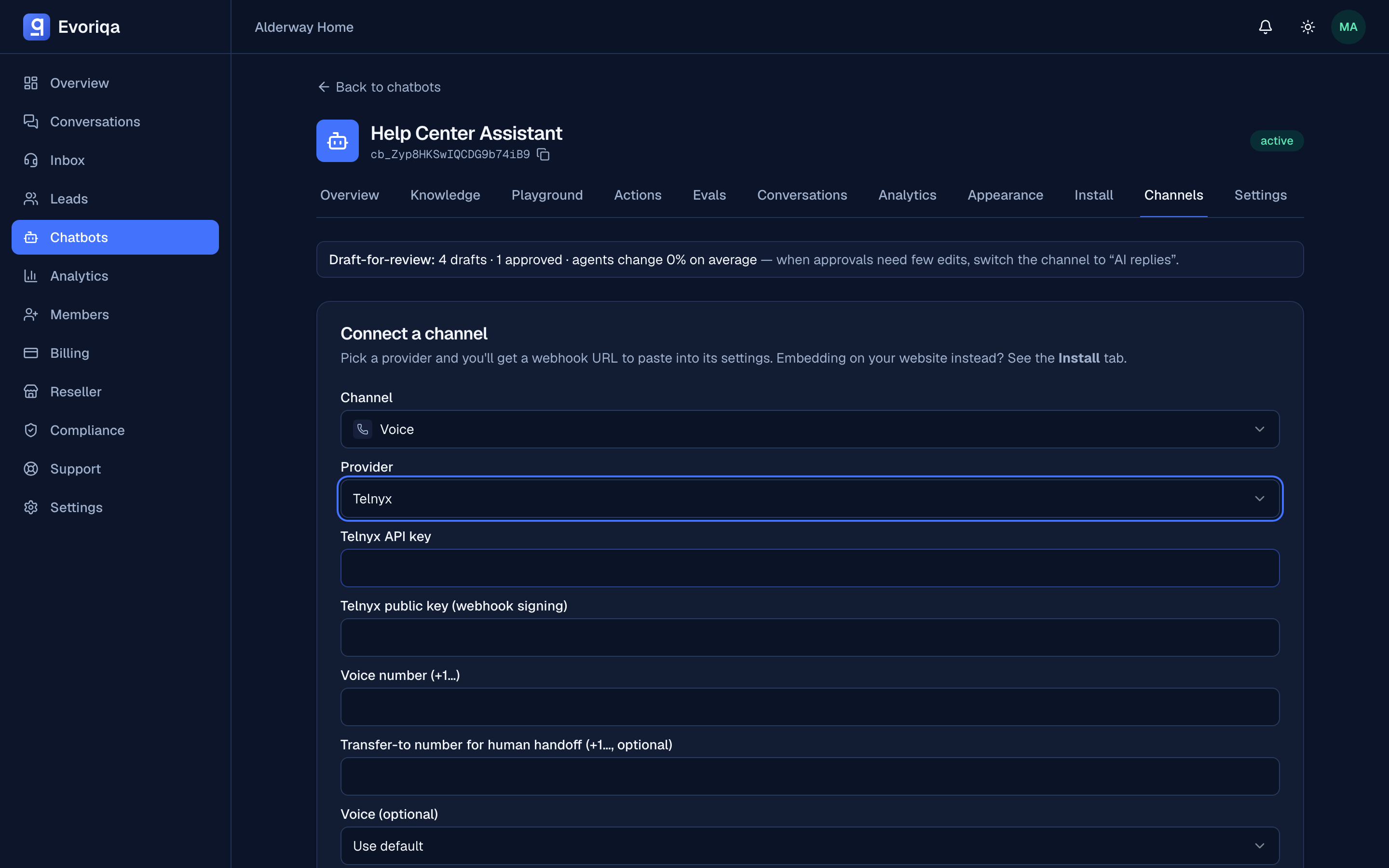
Field Value Rules API key Telnyx portal → API Keys Required Public key Telnyx portal → Keys & Credentials → Public Key — the same key as SMS; see Find your Telnyx public key Required. Base64 of the raw 32-byte key — 44 characters ending in =Voice number Your voice-capable number, +1…Required Transfer-to number Where human handoff dials, +1…Optional Voice TTS voice, from the dropdown Optional — defaults per language Speech locale STT/TTS locale, from the dropdown Optional — defaults from the bot's language Greeting The first thing callers hear Optional — defaults to the bot greeting, then "Hi, you've reached bot name…" API key scopes: Telnyx API keys are not scoped. Every key reaches the whole account, so create a dedicated key for this channel (set an expiry if your policy calls for one). That way you can revoke it without touching anything else.
- 2Copy the voice webhook URL shown after connecting.
- 3In the Telnyx portal, create a TeXML Application, set its Voice webhook URL (the "when a call comes in" hook) to that URL (
POST), set the Status Callback URL to the channel's status URL (…/api/voice/{channelId}/status,POST), and assign the application to your number. The status callback is what closes the conversation and meters the minutes when the caller hangs up — treat it as required, not optional: without it, threads linger open and calls never bill.
The four Telnyx webhooks
The channel exposes four endpoints under /api/voice/{channelId}/…. You only ever configure the first (and optionally the last) in the portal — the middle two are minted per-turn by the platform itself:
| Endpoint | Who calls it | Purpose |
|---|---|---|
/incoming | You set it on the TeXML Application | A call comes in — greeting + first listen |
/respond | Minted per turn in the TeXML <Gather> | Each transcribed utterance — one AI turn |
/dial-status | Minted on transfer in the <Dial> | Reports whether the human answered |
/status | Optional Status Callback on the number | End-of-call event — closes the thread, meters minutes |
Every voice webhook is authenticated with the same Ed25519 scheme as messaging — a signature over {telnyx-timestamp}|{raw body}, with a 5-minute replay window. The signature covers the body, not the URL, so the webhook verifies on any host. On top of that, each /respond URL carries a single-use turn nonce — a replayed turn is acknowledged but never re-runs (or re-bills) the AI.
The app answers with TeXML (<Gather input="speech">, <Say>, <Dial>); Telnyx runs the speech engines, so the app only ever deals in plain text. Speech recognition is pinned by the platform to Deepgram nova-2 with a 2-second end-of-speech timeout, and every listen carries keyword hints (your bot's name plus booking and handoff vocabulary) to bias transcription — there is nothing to configure and no engine choice to make on the Telnyx side.
Connect with Infobip (Calls)
Where Telnyx renders TeXML that the provider executes, Infobip's Calls API is command-driven — the app answers each call event by firing its own REST actions (answer, say, capture speech, connect, hangup) against the live call.
- 1Add a Voice channel, choose Infobip, and fill:
Field Value Rules API key Infobip portal → Developers → API Keys Required Base URL The xxxxx.api.infobip.comhost — paste it ashttps://xxxxx.api.infobip.comRequired — validated against that exact shape Voice number Your Infobip voice number Required Transfer-to number Where human handoff dials Optional Voice / Speech locale / Greeting Same as Telnyx Optional API key scopes: when you create the key, grant
calls:traffic:send. It covers the call actions (answer,say,capture speech,hangup) and theconnectdialog for live transfer. If Infobip refuses any of them with403, use the broadercalls:manageinstead, which covers every Calls API endpoint. Call events arrive on the?secret=webhook, which needs no scope.The connect response returns a one-time inbound secret; the channel's events URL already embeds it as
?secret=…. - 2Create a Calls Configuration. Infobip creates it through its API, not the portal:
curl -X POST "https://xxxxx.api.infobip.com/calls/1/configurations" \ -H "Authorization: App YOUR_API_KEY" \ -H "Content-Type: application/json" \ -d '{"name": "Evoriqa voice"}'Both
idandnameare optional; leave outidand Infobip generates one. The201response returns theid, which is yourcallsConfigurationIdfor the next two steps. A key withcalls:managecovers this call, so if the channel's key has onlycalls:traffic:send, run it with a separate key. - 3In the Infobip portal, give the configuration an events subscription — that subscription, not the configuration itself, is what holds the webhook URL. Under Developer Tools → Subscriptions Management, create (or edit) a subscription and walk its four screens:
- Category — pick Voice and WebRTC (
VOICE_VIDEO). Name it anything; leave the subscription group empty. - Events — the portal ticks every event by default. Click Clear selection, then tick only the six the platform acts on:
Portal label Event What the platform does Call received CALL_RECEIVEDAnswers and greets the caller Speech captured SPEECH_CAPTUREDRuns one AI turn Dialog finished DIALOG_FINISHEDTransfer bridged to the human Dialog failed DIALOG_FAILEDTransfer never bridged Call finished CALL_FINISHEDCloses the call and meters its minutes Call failed CALL_FAILEDCloses the call; nothing is billed Any other event is acknowledged and ignored, so extra ticks do not break calls — they only add a webhook request for every ring, media and recording change.
- Filtering — set Calls Configuration to your
callsConfigurationId. Clear the Application filter (the portal may prefilldefault): it passes only events tagged with that application, so a mismatch drops every event without an error. Leave the other filters empty. - Notification profile — create a profile whose Webhook URL is the channel's voice events URL — the full
…/api/voice/{channelId}/events?secret=…URL shown after connecting, including the?secret=query (a URL pasted without it authenticates nothing and every event is rejected). Leave Security settings empty; the?secret=is the authentication.
The subscription step is portal-only — Infobip does not expose a subscriptions API on most accounts.
- 4Route the number's inbound calls to the configuration. In the portal's Numbers app, open your number's Voice tab and create an inbound configuration whose forward action is Forward to subscription (
FORWARD_TO_SUBSCRIPTION), naming yourcallsConfigurationId. From then on,CALL_RECEIVEDand the rest of the call events post to the webhook. A number can point at only one configuration; one configuration can serve several numbers.
How Infobip voice events are handled
Infobip does not sign webhooks: every event is authenticated by the ?secret= query param, compared in constant time. A wrong or missing secret is 403; unconfigured or unknown-provider channels drop (204) rather than error, since Infobip retries any non-2xx.
All call events arrive on the single /events URL: CALL_RECEIVED starts the call, SPEECH_CAPTURED drives each AI turn, DIALOG_FINISHED/DIALOG_FAILED report the transfer, and CALL_FINISHED closes and meters. Because Infobip events carry no per-turn token, the platform keeps its own call state and deduplicates each speech event by content hash — retried events never re-run a turn. Speech capture listens up to 30 seconds per turn, ending after ~2 seconds of silence.
Connect with the API
`POST /channels` takes the same credentials as either form, plus every optional voice setting — including the two the form does not expose. config.provider picks the transport; omitting it fails 422 with "Pick a provider for this channel."
{
  "type": "voice",
  "chatbotId": "3f2504e0-4f89-41d3-9a0c-0305e82c3301",
  "config": {
    "provider": "telnyx",
    "apiKey": "KEY…",
    "publicKey": "…",
    "fromNumber": "+15550001111",
    "voice": "Polly.Joanna",
    "language": "en-US",
    "greeting": "Hi, thanks for calling Northwind.",
    "forwardNumber": "+15550002222",
    "transferMessage": "One moment while I connect you.",
    "dialTimeout": 20
  }
}provider, apiKey, publicKey and fromNumber are required (Infobip takes provider, apiKey, baseUrl and fromNumber instead). Everything after them is optional and falls back to a server default when omitted or empty.
voice and language are validated against the chosen provider's allowlist and reject anything outside it — Polly.Joanna on Telnyx, the per-locale infobip-default-<locale> ids on Infobip. Because the allowlist is keyed on the provider, a config with no provider has an empty catalog: any non-empty voice or language is rejected before the missing-provider error is even reached.
Voice, locale, and greeting
The voice and speech locale are chosen from a curated allowlist rendered as dropdowns (with "Use default") on the connect form; the locale list narrows to the ones the chosen voice actually speaks. Leave either empty and the platform derives it from the chatbot's language (for example a bot set to Spanish speaks es-ES with the Spanish default voice).
- Telnyx voices are Amazon Polly ids — standard (
Polly.Joanna) and neural (Polly.Joanna-Neural, higher provider rate) — across ~14 locales. - Infobip voices are per-language defaults — the locale is what you are really choosing.
The greeting falls back in a chain: channel greeting → the chatbot's greeting message → "Hi, you've reached bot name. How can I help you today?".
AI disclosure — if AI-interaction disclosure is enabled on the chatbot (or mandated by a reseller), callers hear the disclosure line ("You're chatting with an AI assistant.") before the greeting. That is configured on the chatbot, not the channel, and is on by default.
Two advanced knobs exist in the channel config, settable only at connect via `POST /channels` — the form does not expose them, and the channel PATCH changes only active and aiFirst, never the config:
| Config key | Effect | Default |
|---|---|---|
transferMessage | Spoken just before dialing the transfer number | "Sure, please hold while I connect you with a member of our team." |
dialTimeout | Seconds to ring the transfer number, clamped to 5–60 | 20 |
Changing either on a live channel means disconnecting and reconnecting it, which issues a new inbound secret and webhook URL.
Human handoff
When a caller asks for a person — or after a knowledge gap, when the AI invites them to say "agent" — the call is warm-transferred to your transfer-to number (Telnyx <Dial> / Infobip connect), announced by the transfer message and dialed with your channel's own number as caller ID.
| Situation | What happens |
|---|---|
| Transfer number set, someone answers | The caller is connected; the conversation is marked human-handled and appears in the Inbox |
| Transfer number set, no answer | The caller is handed back to the AI ("I couldn't reach a team member…") rather than stranded |
| No transfer number set | The AI keeps the microphone open and invites the caller to leave details for follow-up; the thread is flagged needs_human |
A thread that a human is handling (or waiting to handle) is never auto-closed by the end-of-call event — it stays in the inbox for follow-up.
Booking on a call
If the chatbot has the book-appointment action enabled, callers can schedule by voice — and the flow never involves a link: a caller can't tap one, so nothing link-shaped is ever spoken. Which of two flows runs depends on what your scheduling setup can do:
- Instant booking on the call — the agent collects the caller's name, email (read back aloud to catch mishears), and preferred time, then books directly through the provider. Available with Cal.com on any Cal.com plan (API-key based) and Calendly on a paid Calendly plan (its instant-booking API is paid-only).
- Scheduling callback — when the setup can only produce a booking link (Simple mode, Calendly's free plan) or a booking attempt fails, the agent tells the caller the team will call them back to schedule, then still collects their name, email (read back), and preferred time for that callback. When the call ends — including when the caller just hangs up mid-flow — the conversation lands in the inbox flagged
needs_humanwith a scheduling-callback note, so the promise is always kept. The flag is applied at call end, not mid-call, so the agent stays conversational long enough to actually collect the details. A completed live transfer to your team supersedes the pending callback.
On other channels the same Simple-mode setup shares the booking link as usual — the callback flow is voice-only behaviour.
In the inbox
Calls land in the unified inbox tagged voice with a full transcript — every caller utterance and every spoken reply — linked to a contact by phone number, and enriched with the same intent, sentiment, and lead score as chat.
Metering
Voice costs more than chat, and is metered accordingly:
- Each minute debits credits at a per-minute rate (default 2,500 credits per minute, configurable per platform), on top of the per-turn AI cost.
- Billing is in six-second increments, rounded up, applied once when the provider reports the call completed. Metering is idempotent per call — provider callback retries never double-bill.
- Some plans carry a voice-minute soft cap, checked at call start only so an in-flight call always finishes: Free 10 min/month, Starter 120, Pro and Business uncapped. Over the cap, the AI does not pick up and the call routes to your fallback — dial the team, or take a message — while chat keeps working normally.
- Resold client workspaces do not count against a cap.
If credits run out mid-call, the caller hears a graceful spoken message rather than silence. See Credits and top-ups.
Limits and safeguards
- Only an Active chatbot answers; a suspended or deleted bot plays a polite "not set up to take calls" message.
- Flood shield: 1,200 webhook requests/minute per channel+IP, then 60 calls/minute and 120 turns/minute per channel — far above real call volume, present to absorb provider storms.
- A paused channel stops answering but keeps its configuration.
- Connecting a number that another channel already uses shows a duplicate-number warning — one number has one webhook slot.
- Every failure path speaks an apology or ends the call cleanly; a caller is never left in dead air, and a failed AI turn flags the thread for a human callback.
Troubleshooting
| Symptom | Cause |
|---|---|
| Calls ring out | The "call comes in" / events webhook is not set to the channel URL, or the number is not attached to the TeXML Application / Calls Configuration |
| Call picks up, then drops instantly (Infobip) | Infobip's platform is rejecting the call before any webhook — the call log shows FAILED at 0s, errorCode 10300 FORBIDDEN. Ask Infobip support to enable inbound Calls on the DID |
| Signature rejected | Telnyx: the public key on the channel is wrong — re-paste it from Keys & Credentials → Public Key, not API Keys. Infobip: a bad or missing ?secret= — check the subscription URL kept its query string |
| AI never picks up | The plan's voice-minute cap for the month is used up, or the chatbot is not Active |
| Transfers never connect | No transfer number set, nobody answers within the dial timeout, or the number is unreachable |
| Call connects, then silence after the greeting | The per-turn webhook cannot reach the platform — check that the status callback and app URL are correct |
| Minutes not appearing in billing | The provider's end-of-call status event is not configured (Telnyx Status Callback URL) |
Booking calls end needs_human instead of booking | Expected whenever the setup is link-only (Simple mode, or Calendly free) — that's the scheduling-callback flow. Instant booking needs Cal.com, or Calendly on a paid plan |
Where to go next
- SMS — the same Telnyx or Infobip account.
Last updated