WhatsApp via Telnyx
Connect WhatsApp through Telnyx with the same credentials as SMS — three fields, the Ed25519 webhook contract, delivery receipts and the 24-hour window.
This provider route is in beta and off by default. To enable Telnyx WhatsApp for your workspace, open Support in your dashboard and send a request, or email help@evoriqa.com. Each provider route is enabled separately, so ask for Telnyx by name — enabling it says nothing about the other one. Until it is enabled, the WhatsApp connect screen offers the Meta Cloud API route only — which is the recommended one anyway: your own Meta app, no per-message provider fee, and the app branding is yours. See WhatsApp via Meta Cloud API. The other beta route, requestable on its own, is WhatsApp via Infobip. Follow one page, not several.
Telnyx reuses the same credential set as your Telnyx SMS and voice channels, and a WhatsApp channel already connected on Telnyx keeps working regardless of the beta switch.
How the channel works
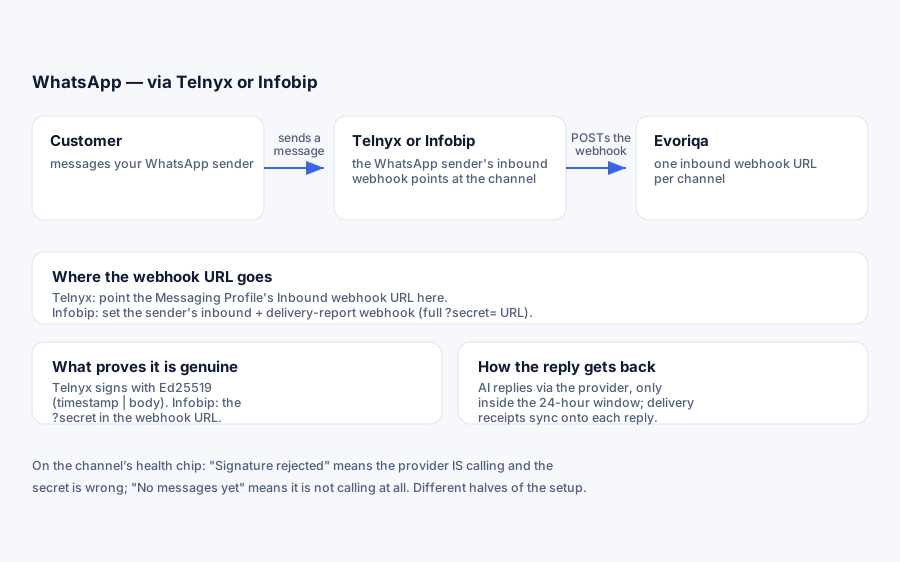
WhatsApp on Telnyx is the same transport as SMS on Telnyx — one inbound webhook URL (https://…/api/channels/{channelId}/inbound), Ed25519-signed webhooks, the same Messaging Profile — with two differences: the number is a Telnyx-provisioned WhatsApp sender, and outbound replies go to Telnyx's WhatsApp endpoint (/v2/messages/whatsapp) instead of the SMS one. If you have already connected SMS on Telnyx, everything below will feel familiar.
What you need
- A Telnyx account.
- A Telnyx-provisioned WhatsApp sender on a number.
- Your API key and the account public key (the base64 Ed25519 key Telnyx signs webhooks with).
Connect
- 1On the chatbot's Channels tab, add a WhatsApp channel, choose Telnyx, and fill — all three required:
Field Value API key Telnyx portal → API Keys Public key Same page — the base64 Ed25519 key Telnyx signs webhooks with WhatsApp number Your Telnyx-provisioned WhatsApp sender, +1… - 2Copy the webhook URL shown after connecting.
- 3In the Telnyx portal, create a Messaging Profile, set its Inbound webhook URL to that webhook URL (method
POST), and attach the profile to your sender.
How webhooks are verified
Inbound webhooks are JSON API-v2 events signed with Ed25519 over {telnyx-timestamp}|{raw body} — headers telnyx-signature-ed25519 and telnyx-timestamp. A timestamp older than 5 minutes is rejected (replay protection). The signature covers the body, not the URL, so the webhook verifies on any host. A failed verification returns 403 and flips the health chip to Signature rejected. Credentials are stored encrypted.
Inbound messages arrive as message.received events (text plus up to 10 media URLs); delivery receipts arrive as message.finalized events on the same URL.
Connecting a number already in use on another chatbot for the same type shows a duplicate-number warning naming that bot — one number has one webhook slot. You can proceed deliberately.
Connect with the API
`POST /channels` takes the same credentials as the form. config.provider selects the transport — telnyx here — and all four keys are required:
{
  "type": "whatsapp",
  "chatbotId": "3f2504e0-4f89-41d3-9a0c-0305e82c3301",
  "config": {
    "provider": "telnyx",
    "apiKey": "KEY…",
    "publicKey": "…",
    "fromNumber": "+15550001111"
  }
}Omit provider and the call fails 422 with "Pick a provider for this channel." publicKey is what verifies Telnyx's Ed25519 webhook signatures — without the right one every inbound delivery is rejected. fromNumber is this channel's identity for the duplicate-number check. The same three credentials connect SMS and Voice; only type changes.
Verify it works
Message the WhatsApp sender. The conversation should appear in the Inbox tagged WhatsApp, and the AI should reply. The health chip separates "Telnyx is not calling us" (No messages yet) from "Telnyx is calling and the public key is wrong" (Signature rejected).
Message flow
Inbound messages link the sender to a contact by phone number, join their open WhatsApp thread on this chatbot (or start a new one), and are deduplicated by provider message id so Telnyx retries never duplicate. Inbound media rides along as provider URLs — download anything you need to keep, they can expire.
With AI replies on (default), the AI answers new threads through the same grounded pipeline as the widget; asking for a person escalates to the inbox wait queue. Off, every new thread lands flagged needs_human. A failed AI turn degrades to the human queue rather than going silent.
Replies are normalised for WhatsApp — markdown bold becomes WhatsApp's single-star *bold*, links become label: url. Outbound is text-only: no attachments, and no template messages.
The 24-hour window
WhatsApp only allows free-form replies inside a 24-hour customer-service window, which resets on each customer message. Outside it, the provider refuses the send: the message is marked Not delivered with the provider's reason. Evoriqa does not send re-engagement template messages, so a conversation that went cold has to be restarted by the customer.
Delivery receipts
Telnyx posts message.finalized receipts to the same webhook, synced onto each outbound reply's row: delivered → Delivered, sent → Sent, delivery_failed / sending_failed → Not delivered with the stored reason and a one-click Retry. Statuses only move forward — a late receipt never downgrades a message. Telnyx does not expose the read receipts or typing indicator that the Meta Cloud API provides.
Limits
- Inbound webhook: 120 requests per minute per channel/IP; body capped at 2 MiB; signatures rejected outside the 5-minute window.
- Inbound media: up to 10 attachments per message.
- Outbound: free-form text only.
- A paused channel rejects new inbound but still delivers replies to open threads.
Troubleshooting
| Symptom | Cause |
|---|---|
| No messages yet | The sender's inbound webhook is not pointed at the channel |
| Signature rejected | The public key on the channel does not match the Telnyx account |
| Not delivered, window reason | Outside the 24-hour window |
| Not delivered, other reason | Read the stored reason, fix it, then Retry |
| Messages land on the wrong chatbot | Another channel claimed the number — see the duplicate warning |
Where to go next
Last updated