Start from a template
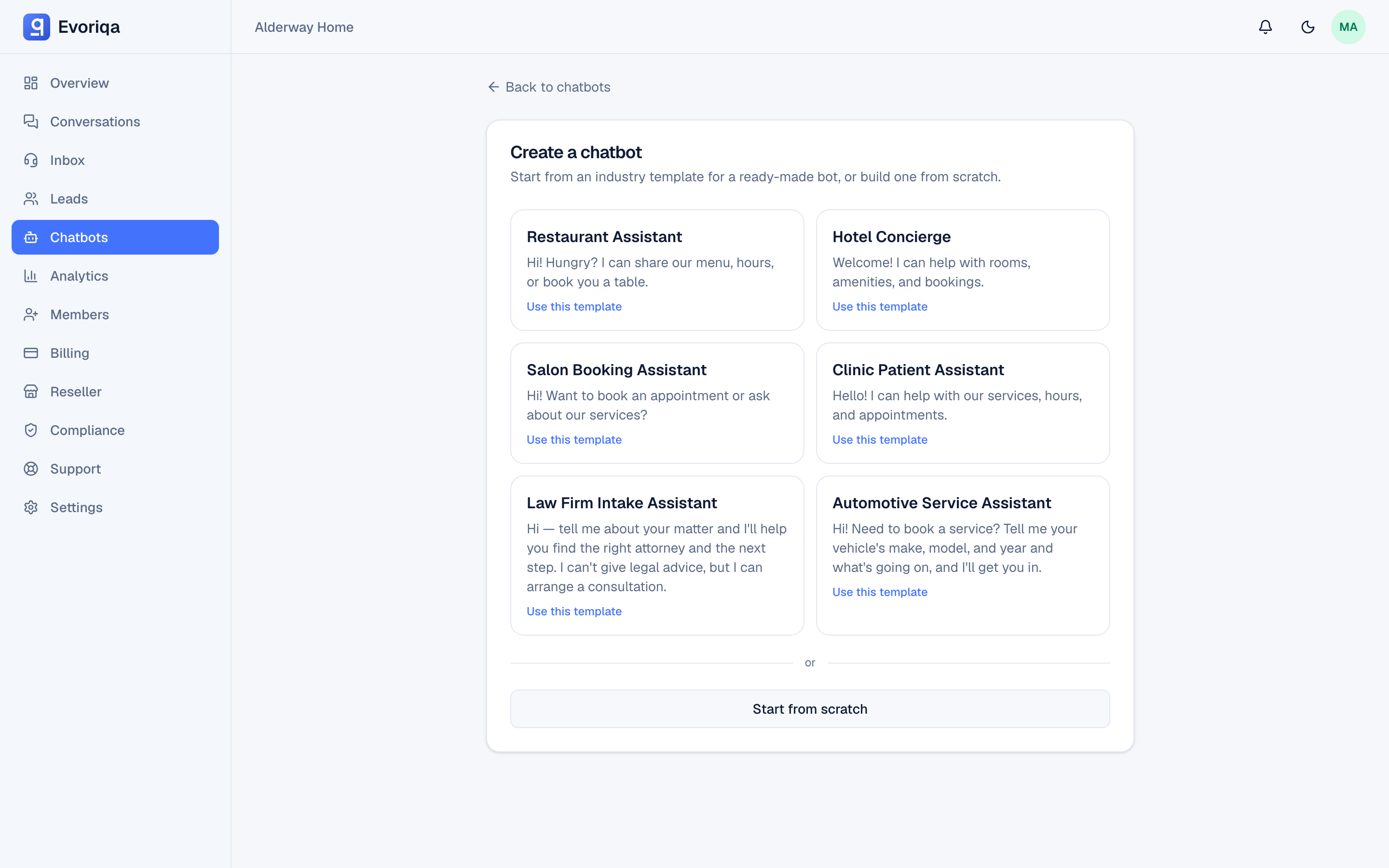
The six industry templates, exactly what each one pre-fills, what counts against your limits, and how to replace the sample content.
A template creates a working chatbot in one click, pre-filled with a persona, a starter FAQ, sample documents, and a set of enabled actions. It is the fastest way to see a realistic conversation before you have written any content of your own.
Open Chatbots → New from template and pick one.
The templates
| Template | Bot persona |
|---|---|
| Restaurant Assistant | Host — menu, hours, reservations |
| Hotel Concierge | Concierge — rooms, amenities, stays |
| Salon Booking Assistant | Booking assistant — services, slots |
| Clinic Patient Assistant | Patient assistant — visits, intake |
| Law Firm Intake Assistant | Intake assistant — matters, consults |
| Automotive Service Assistant | Service assistant — repairs, quotes |
What a template pre-fills
Every template seeds the same four things:
- The chatbot itself — named after the template, with its own bot name, greeting, and system prompt.
- A starter FAQ source — a set of question-and-answer pairs for that industry, added as one FAQ knowledge source.
- Sample documents — exactly three manual-text sources such as a service list or a policy page.
- Actions —
capture_lead,book_appointment, andescalate_to_humanare enabled. See Actions overview.
Two templates go one step further: the Law Firm Intake Assistant and the Automotive Service Assistant also seed suggested questions — the starter chips shown in the widget before the visitor types anything. The other four start with none.
Lead capture is switched on for template chatbots.
The seeded knowledge is sample content, not your business's information. Every seeded source is titled … (sample — edit me) and its first line says so. A template chatbot will confidently quote sample opening hours and sample prices until you replace them. Edit or delete every sample source before you embed the widget on a live site.
What counts against your limits
A template creates one chatbot and several knowledge sources at once, so it is checked against both your plan's chatbot limit and its knowledge-source limit before anything is created. If either would be exceeded, nothing is created and the request fails — you are not left with a half-seeded bot.
The chooser checks this before you pick. Every template adds four knowledge sources (its FAQ and three sample documents), so a template that needs more than your plan has left is shown disabled, marked with how many it needs, under a note pointing to an upgrade — or, if an agency or reseller runs your account, to your provider. On Free, which holds one knowledge source, start from scratch instead.
The seeded sources are processed by the same background worker as any other source, so they show as processing for a short while before the bot can answer from them. See Knowledge base overview.
Diverging from a template
Nothing about a template is sticky. Once created, the chatbot is an ordinary chatbot:
- Edit or delete the sample sources under Knowledge.
- Rewrite the system prompt and greeting under Settings.
- Turn actions off, or configure them against your own systems, under Actions.
There is no link back to the template, and updating a template later does not change chatbots already created from it.
Where to go next
- Create a chatbot — start from scratch instead.
Last updated